
How to Change the Temperature on NikMann Edgebanders
Learn how to check and adjust the glue-pot temperature on NikMann edgebander. This guide explains how to check and adjust the glue temperature. It also covers common problems caused by glue that is too hot or too cold.
Request Technical Support Call 1300 4 FORZA
How to Check and Adjust Glue Pot Temperature
Correct glue-pot temperature is important for good edge-banding results. It helps the adhesive flow evenly and creates a strong bond between the edge tape and panel.
This guide explains how to check and adjust the glue temperature on a NikMann edgebander.
Why Is Glue Temperature Important?
Incorrect temperature can affect glue application and bonding quality.
- Glue too hot – may cause adhesive damage or poor bonding.
- Glue too cold – may result in poor glue flow and weak bonding.
- Correct temperature – helps provide even glue coverage and strong adhesion.
What This Guide Covers
- How to check the glue-pot temperature
- How to adjust the temperature setting
- What to check if the glue is too hot
- What to check if the glue is too cold
- How temperature affects edge-banding quality
Temperature settings depend on the adhesive type and machine model. Always follow the adhesive manufacturer's instructions and the recommended NikMann machine settings.
How to Change the Glue-Pot Temperature
Use the following general procedure as a guide. The actual buttons, menus and confirmation steps depend on your edgebander and temperature controller.
Check the Recommended Temperature
Read the adhesive manufacturer's technical data sheet and confirm the recommended application temperature. Do not choose a setting based only on the glue's appearance.
Locate the Temperature Setting
On a dedicated controller, identify the set-temperature function. On a touchscreen machine, locate the relevant heating or glue-pot settings menu using the machine manual.
Adjust the Set Temperature
Use the controller's specified adjustment method to enter the required temperature. Change the setting only as needed to match the adhesive manufacturer's recommendations.
Confirm and Save the Setting
Follow the controller's instructions to confirm or save the new value. Some systems apply the setting immediately, while others require a confirmation step.
Allow the Glue to Reach Temperature
Allow sufficient time for the glue pot and adhesive to reach the required operating temperature. Check the actual temperature display where available.
Test the Bonding Result
Once the machine is ready, process a suitable test panel using the approved operating procedure. Check adhesive application, edge adhesion and the finished glue line.
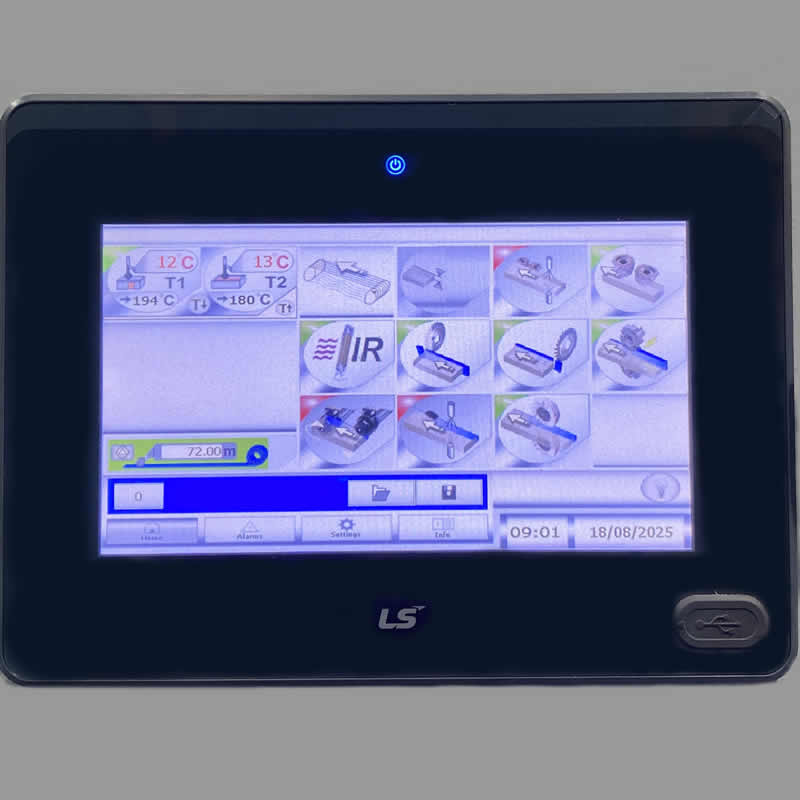
Touch Screen Controller
- ✅ Temperature Control: Set and monitor the glue pot temperature to match EVA or PUR adhesives;
- ✅ Unit Activation/Deactivation: Easily switch on or off specific units such as pre-milling, gluing, end trimming, top/bottom trimming, scraping, and buffing;
- ✅ Speed Adjustment: Control the feed speed to suit different materials and production requirements;
- ✅ Diagnostics & Alerts: Monitor machine status, view error codes, and receive alerts for maintenance or troubleshooting;
- ✅ Safety & Lock Functions: Built-in protections prevent unauthorised access and ensure operator safety.
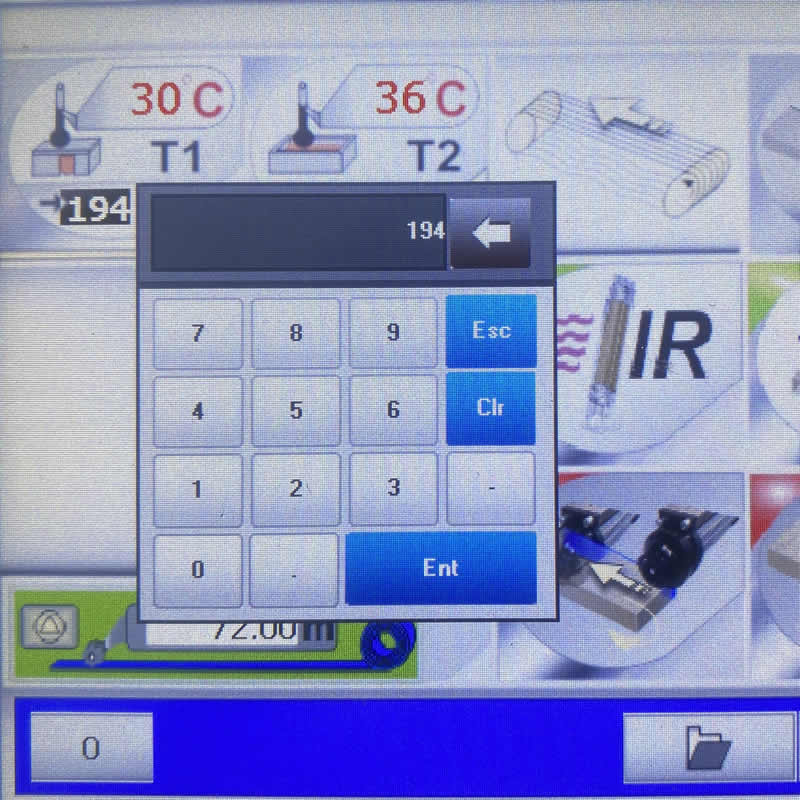
Adjusting the Glue Roller Temperature:
- ✅ Access the Control Panel: On your NikMann edgebander, locate the temperature control on the operator’s panel or touchscreen (depending on the model);
- ✅ Check the Current Setting: The display will show the current glue pot temperature;
- ✅ Adjust the Temperature: Input the desired value and press ENTER;
- ✅ Wait for Stabilisation: The machine will begin heating up or cooling down. Allow a few minutes for the glue pot to reach the new set temperature before resuming operation;
- ✅ Follow Manufacturer’s Guidelines: Always set the temperature according to the adhesive manufacturer’s recommendations (typically 180–200°C for EVA glue and 120–140°C for PUR glue) to ensure proper bonding without burning or damaging the glue.
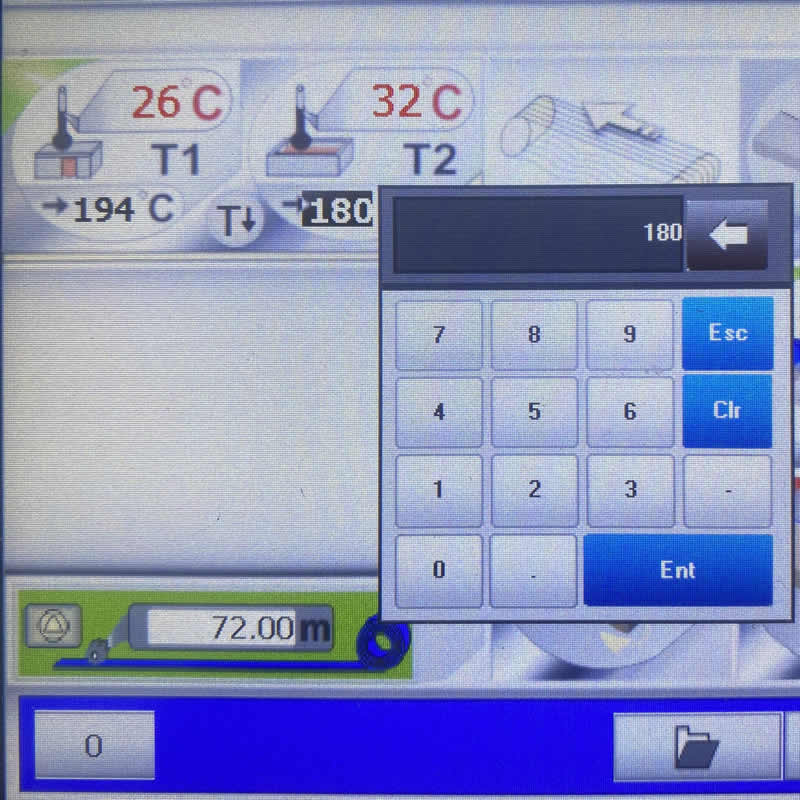
Adjusting the Glue Pot Temperature:
- ✅ Access the Control Panel: Locate the temperature settings on the operator’s panel or touchscreen (depending on your NikMann edgebander model);
- ✅ Verify Current Setting: The display will indicate the current glue roller temperature;
- ✅ Set the Desired Temperature: Enter the required value and confirm by pressing ENTER;
- ✅ Allow Stabilisation: The machine will heat or cool accordingly. Wait a few minutes until the glue pot reaches the new temperature before continuing operation;
- ✅ Follow Manufacturer Guidelines: Always set the temperature according to the adhesive specifications: typically 180–200°C for EVA glue and 120–140°C for PUR glue. This ensures proper bonding without overheating or damaging the glue.
Common Glue-Pot Temperature Problems
Before adjusting the temperature, identify the symptoms and confirm that the adhesive and machine settings are suitable for the application.
Glue Temperature Too Low
Adhesive that is not hot enough may have poor flow, uneven application or insufficient wetting of the panel and edging. This can contribute to weak bonding or visible glue lines.
Check: The displayed temperature, adhesive specifications, heating status and whether the glue has reached its operating temperature.
Glue Temperature Too High
Excessive heat may cause adhesive discolouration, degradation, smoke or changes in bonding performance. Prolonged exposure to excessive temperature can damage the adhesive.
Check: The temperature setting and maximum permitted temperature specified by the adhesive manufacturer.
Temperature Fluctuations
If the displayed temperature changes unexpectedly or does not stabilise, the cause may be related to the temperature sensor, heating element, controller or electrical connections.
Check: Whether the display reaches the set temperature and remains reasonably stable during operation.
Glue Not Melting Correctly
Adhesive that remains solid or melts unevenly may indicate insufficient heating, incorrect adhesive, an unsuitable setting or a problem with the heating system.
Check: The adhesive type, machine compatibility and the manufacturer's recommended operating procedure.
Incorrect Adhesive Selection
EVA and PUR hot-melt adhesives have different processing requirements. Using the wrong temperature for the adhesive can affect application and bonding quality.
Check: The adhesive packaging and technical data sheet before changing any machine setting.
Glue-Pot Alarm or Heating Fault
If the glue pot does not heat, overheats or displays an alarm, the problem may be electrical or related to the temperature control system rather than the selected setting.
Check: The alarm message and machine manual. Do not bypass safety devices or continue operating with an unresolved heating fault.
Get the Best from Your Edgebander
Correct glue-pot temperature helps support reliable bonding, consistent adhesive application and a quality finished edge. Follow the adhesive and machine manufacturer's instructions, and contact Forza Machinery if you need technical assistance.